.png)
What Are AI Sales Alerts and How Do They Automate Trigger Notifications for Modern Sales Teams?
In the high-speed environment of B2B selling, AI sales alerts are computerized alerts about important events or cues in a prospect's behavior or business situation—transmitted immediately to a salesperson or workflow system so action can be taken immediately. Instead of holding out for a prospect to respond, click, or reply weeks from now, AI sales alerts serve as real-time lighthouses, informing your team exactly when a lead is most "awake" or ready for contact.
The problem for today's sales teams is this: timely engagement of prospects usually makes or breaks the conversion of a lead. Delays of every minute can minimize connection rates, response chances, or buying interest. Monitoring news feeds, company releases, social signals, hiring activity, and other behavioral data manually is not scalable.
Next-gen notifications powered by AI. These systems monitor for events that will trigger a notification to the appropriate representative or team based on identified rules (for example, for a funding round, a C-suite hire, an equipment purchase, or a product launch). The sole purpose is to notify a rep or team, being responsive to the timing of the prospect, not lagging behind it.
OneShot.ai is built to solve this problem at scale. Its automation platform filters, prioritizes, and routes notifications intelligently so that your team acts quickly, but also intelligently.
What Are Trigger-Based Sales Alerts and Why Are They Crucial for Outbound Prospecting?
How do traditional sales teams detect engagement signals today?
Sales teams have long used a mosaic of manual and semi-mechanical tools to identify engagement signals. These include Google Alerts and news monitoring, which can be noisier and lag behind, and services such as Crunchbase or PitchBook that list funding rounds but usually hours later. Intent or firmographic databases monitor behavioral patterns but can be uncertain about assigning signal attribution.
Sales intelligence platforms such as LinkedIn Sales Navigator or ZoomInfo provide alerts, although often with less flexibility to customize. Most teams also rely on human research or SDRs to dig through press releases, SEC filings, job boards, and social media posts. Although this can work at smaller volumes, it tends to fail as volumes and the complexity of signals increase.
What are the most common sales triggers (funding rounds, job changes, tech stack updates)?
Valid sales triggers are funding news (such as Series A or strategic rounds), hirements of executives (such as new CEOs or VPs), department-wide hire sprees, tech stack shifts, expansions into new markets, M&A, or product releases.
Intensity spikes in intent signals such as web visits, content downloads, or ad engagement are also important, as well as regulatory or industry- related events. Yet not all triggers are equally applicable to each ICP (ideal customer profile), and this is where AI comes in to assist in prioritizing and contextualizing the signals.
Why do real-time alerts lead to higher prospect response rates?
Real-time notifications increase response rates mostly because of timing and segmentation. Customers are more likely to respond when outreach is immediate after a salient trigger, so reps can leverage new interest.
Responding quickly also makes teams stand out from slower peers, so they are perceived as more knowledgeable and advisory. As the window to act is frequently short, timely notifications can have a dramatic effect on meeting rates and pipeline velocity.
What are the pitfalls of manual trigger tracking?
Manual or semi-manual tracking often fails due to:
- Latency — News, press releases, or filings often lag behind real events.
- Noise and false positives — Generic announcements may not signal buying intent
- Missed signals — Smaller deals, regional news, or product-level updates often get overlooked.
- Scalability issues — As your territory or ICP grows, manual tracking can't keep up
- Context gaps — Knowing that something happened isn’t enough—teams need why and what it means
- Because of these weaknesses, many organizations rarely respond within the optimal window.
How Does AI Automate Trigger Notification Workflows?
What are the technical components behind AI-powered alerts?
The architecture of the system involves multiple technical layers: a data ingestion layer to aggregate signals from varied platforms; detection of change and extraction of events through NLP and data comparison; signal scoring to gauge priority; routing logic to distribute alerts to the appropriate team member; and notification systems to facilitate quick delivery.
A feedback loop lets reps tag alerts as useful or irrelevant, making model accuracy improve constantly.
How does an AI engine detect and prioritize real-time trigger events?
To identify and rank actual-time events, the AI system contrasts existing data with a firm's baseline profile (e.g., leadership, funding, tech stack). It applies semantic NLP to understand events, rates them on fit and immediacy (e.g., a Series B round in a targeted vertical), and eliminates low-value noise.
NLP and machine learning also allow for deeper interpretation, including the extraction of important entities and relationships, sentiment detection and recency, and detecting anomalies like sudden spikes in hiring.
How can AI ensure alerts are relevant and routed to the right team member?
To make alerts timely and actionable, AI systems correlate signals to ICP criteria, impose territory and account logic, and deduplicate alerts. Routing adjusts according to rep capacity or skill.
Confidence thresholds guarantee high-quality alerts only reach reps, cutting noise and achieving maximum impact. OneShot.ai automates all the above, transforming complicated buyer signals into real-time, pertinent sales opportunities.
What Types of Sales Triggers Can AI Monitor and Automate Today?
AI trigger systems are now capable of tracking a broad range of signals with growing sophistication.
Can AI detect job changes, hiring sprees, funding announcements, and tech adoption?
Yes—these are among the most prevalent and easiest to discover sales triggers. AI may follow job shifts and leadership changes from sources such as LinkedIn, press releases, or SEC filings. Employment trends are captured through job postings or headcount metrics.
Funding events are gathered from Crunchbase and press wires, while changes in tech stack may be inferred from job postings or vendor onboarding data. Product launches and acquisitions are often discovered via news or PR channels.
How are intent databases and public signals integrated into AI trigger systems?
AI systems often combine public signals with intent data from platforms like Bombora, G2, or 6sense. These tools provide topic-level intent (e.g., "evaluating CRM"), which can be mapped to your solution categories.
When intent spikes align with trigger events—like funding or hiring—the signal strength increases. This layered approach helps AI systems better assess a prospect’s likelihood to engage.
Can AI personalize alerts based on ICP (ideal customer profile)?
Yes, AI can personalize alerts based on your Ideal Customer Profile (ICP). An AI system can sift through signals by firmographic attributes such as size, industry, tech stack, and geography.
Signals can be given priority to events from accounts already in your pipeline, and to personalize the alerts by persona, for instance, funding news updates to AEs and tech signals to solution engineers. Contextual factors such as recent hiring or product mentions can also enhance the alerts.
What new trigger sources are emerging with generative AI?
Generative AI is unveiling new categories of triggers. These are publishing of content signals (e.g., whitepapers, blogs), behavior on code repositories (e.g., GitHub), and AI tool adoption (e.g., LLMs or prompt use).
Public discussion in chat forums or support threads can indicate product interest, and behavioral AI models can forecast buying intent prior to conventional signals even appearing.
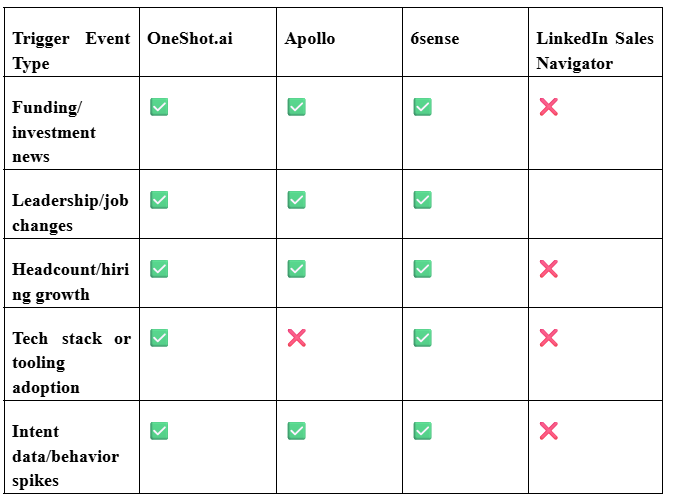
Here’s a comparative table of popular trigger event types and which platforms support them today:
“intent databases” → see our blog on AI in Lead Scoring
“ICP” → learn about our Persona Agent strategy at OneShot.ai
How Does OneShot.ai Automate Trigger-Based Sales Alerts More Intelligently?
If multiple platforms can detect triggers, what gives OneShot.ai an edge?
What makes OneShot.ai different from other AI sales automation tools?
OneShot.ai is unique with a single agent stack – Insight, Persona, and Personalization Agents – that not only senses signals but acts upon them. It adds depth to alerts in the form of company history and relevant events, and a feedback loop allows reps’ replies to enhance the system. Its modular design also combines first-party, public, and intent data for more precise insights.
How does the Insight Agent detect deeper, less obvious triggers?
The Insight Agent monitors sustained changes like steady hiring expansion and group-related signals – such as capitalizing along with new engineering positions – into strong composite alarms. It puts strength scores on “hot” signals to get action priority and eliminates low-confidence noise to prevent alert fatigue.
How do the Personalization and Persona Agents act on trigger data to craft outreach?
Persona Agents conclude the most effective outreach by trigger context, and Personalization Agents create customized snippets—citing events such as funding or mapping to industry messaging. They can further add applicable content and even auto-book follow-ups or pre-write drafts.
Can OneShot.ai sync alerts directly with CRMs and tools like HubSpot and Outreach?
Yes. OneShot.ai natively integrates with CRMs such as HubSpot and Salesforce, pushing notifications into task queues or sales engagement platforms like Outreach and Salesloft. Alert metadata (e.g., score, context) synchronizes into CRM fields, and bi- directional updates ensure synchronization across systems.
Ready to go from signal to send with zero lag? Book a personalized walkthrough of OneShot.ai now.
How Do AI Sales Alerts Improve Response Times and Close Rates?
What’s the average time‑to‑response improvement with AI vs. manual workflows?
- Although each team's volume is different, common benefits are:
- Reducing time-to-response from hours or days to minutes or seconds
- Allowing SDRs to respond to new signals in real-time instead of in hindsight
- Cutting the lag between the signal and outreach significantly
How does predictive timing of outreach enhance deal closure probability?
By landing in the buyer's inbox immediately after they've just publicized an event, your message becomes timely, relevant, and at the front of their mind. AI can also recommend not only when to send but what to send—syncing up your outreach window with when the signal is strongest.
Can AI alerts reduce prospect churn and increase rep efficiency?
Yes. By prioritizing signals, suppressing false positives, and routing efficiently, AI alerts reduce noise, eliminate wasted outreach, and help reps focus on high-probability opportunities.
What are real client results from using OneShot.ai-triggered workflows?
Companies using OneShot.ai’s AI-triggered alerts see:
- 46% higher open rates
- 29% faster prospect follow-up
- 3× more booked meetings in the first week of contact
These metrics underscore how accelerating engagement with high-intent signals converts more pipeline, faster.

What Are the Best Practices for Setting Up High‑Performance AI Trigger Alerts?
How should sales teams define which triggers matter most?
Begin by correlating triggers to your most valuable deals—like those in your target vertical with funding or tech shifts. Prioritize triggers based on historical conversion rates, apply exclusion rules to exclude low-fit signals, and re-prioritize regularly based on rep input.
How do you avoid false positives or irrelevant alerts?
Utilize confidence thresholds to bring forth only high-quality alerts. Allow reps to provide feedback to enable refinement of accuracy, prevent repeat alerts for one and the same signal, and employ signal fusion—alerting only if several signals co-occur.
What timing settings work best for different deal stages?
In early-stage pipelines, employ more general alerts with less stringent thresholds. For upsell or late-stage motions, use more stringent criteria—such as exec changes around current accounts. Time-zone batch alerting, and implement quiet hours to prevent off-hour interruptions.
How can SDRs and AEs collaborate through smart alert routing?
Route early-stage signals to SDRs, then push qualified leads to AEs. Employ team-based routing first, escalate signals when several indicators pile up, and keep an alert history log so both roles remain in sync.
Start building high-impact alert workflows with OneShot.ai’s customizable agent stack.
What Is the Future of AI Sales Alerts in Outbound Prospecting?
How will LLMs and AI copilots evolve sales alerts?
Sales alerts are becoming more and more conversational, with AI copilots reporting on context and recommending outreach. LLMs can author messages or automate initial touchpoints, and alerts can transform from reactive to predictive—anticipating triggers ahead of time.
Can Conversational AI Auto-Respond to Triggers?
Yes, for low-risk interactions such as congratulatory messages. But it is important to stay human in tone, keep compliance, and not over-automate.
What Are the Ethical and Privacy Considerations?
Respect privacy regulations such as GDPR and CCPA, remain clear in data origins, refrain from applying sensitive personal data without user consent, and be cautious of bias or over-targeting in alerting.
How Are Leading GTM Teams Preparing for Autonomous Revenue Execution?
Top teams are piloting AI-based triggers and responses, establishing clear guardrails, creating feedback loops to refine alerts, and aligning sales, marketing, and data teams to effectively manage AI tools.
How Can You Get Started with AI-Triggered Sales Alerts on OneShot.ai?
What tools and integrations are required to launch?
- A target account / prospect database (CRM)
- Intent / signal data feed or subscription
- Connectors to news, API, or data sources (e.g. Crunchbase)
- Integrations with your CRM (HubSpot, Salesforce) or outreach tools
How long does implementation take?
The majority of teams finish the entire integration process—alert setup and CRM synchronization—within 24 hours. This rapid turnaround reduces downtime and has teams up and running with insights shortly after.
With OneShot.ai, most teams are set up with alerts and completely integrated within one day.
What training does OneShot.ai offer?
OneShot.ai provides a strong set of training materials to get teams up to speed. They include onboarding workshops, guided implementation support, and self-service through extensive documentation and video guides.
Even better, AI trainers and the customer success team continue to support, and feedback loops enable users to refine alert thresholds per distinct team requirements or changing strategies.
How does pricing scale with team size?
OneShot.ai's pricing structure scales on a variety of factors. These most often encompass the volume of alerts or accounts being monitored, the number of users or seats, and the total amount of data being ingested.
Companies may also opt for the addition of premium features like advanced analytics or data enrichment, priced as optional add-ons. This adaptable model ensures that pricing correlates with the scope and size of each team's usage.
Conclusion
AI-triggered sales alerts turn responsive prospecting into proactive engagement triggered by signals. By combining real-time detection, smart routing, and actionable context, modern sales teams can close the gap between buyer signals and human outreach—closing more deals, faster.
Join hundreds of go-to-market teams making better moves using AI sales alerts. Start at OneShot.ai.
FAQs
1. What are AI sales alerts?
AI sales alerts are automated notifications powered by artificial intelligence that notify sales teams about key buying signals—such as website visits, email opens, intent data spikes, CRM changes, or product usage milestones—so reps can act at the right moment.
2. How do AI sales alerts work?
AI sales alerts analyze data from CRMs, emails, websites, product analytics, and third-party intent sources. Using rules and machine learning models, they detect meaningful events and trigger real-time notifications via Slack, email, or dashboards.
3. Why are AI trigger notifications important for sales teams?
AI trigger notifications help sales teams respond faster, prioritize high-intent leads, and personalize outreach. This reduces manual monitoring, shortens sales cycles, and improves conversion rates by engaging prospects at peak interest.
4. Are AI sales alerts useful for B2B sales?
Yes. AI sales alerts are especially valuable in B2B sales, where buying cycles are longer and signals are spread across multiple touchpoints. They help reps identify decision-maker activity, account-level intent, and expansion opportunities.
5. What types of triggers can AI sales alerts track?
Common triggers include website activity, pricing page visits, demo requests, CRM field changes, pipeline movement, product usage drops or spikes, and intent data signals. Advanced platforms also support custom triggers via APIs.
%20(1).png)