Low email deliverability and poor domain health can silently ruin even the best outbound campaigns. With automation at the core of today’s sales processes, most teams grow too aggressively without the proper protection mechanisms in place. In this blog, we will dissect the key pitfalls that damage sender reputation and inbox placement, and demonstrate how to ensure high deliverability as you scale your outreach via best practices and AI-based tools such as OneShot.ai.
What Is Domain Health and Why Does It Matter for Outbound Automation?
Domain health is the general reputation and technical soundness of your sending domain. It’s basically how email hosts such as Gmail, Outlook, and Yahoo determine if your emails are trustworthy enough to hit somebody’s inbox – or if they should be filtered out as spam or blocked altogether.
This is earned over time based on how your domain conducts itself, how recipients respond to your emails, and if your technical implementation aligns with contemporary email authentication best practices.
Why does domain reputation directly influence email deliverability?
Your domain reputation is among the most important components of whether your emails reach the inbox or disappear into the spam folder. It determines inbox placement, bounce rates, routing to the spam folder, and even whether your domain gets listed on blacklists such as Spamhaus.
It’s the credit score of your email persona-nothing your writing says will get delivered if your domain reputation is in the tank. A broken domain health profile results in throttled sends, increased bounces, and eventually fewer prospects engaged.
Which metrics should you monitor for domain health?
Monitor important metrics for their domain reputation to remain in front of issues such as blacklist (Spamhaus or Spamcop) status, SenderScore provided by Validity, and data from Google Postmaster Tools tracking domain reputation levels, spam rates, and authentication status.
Additionally, performance metrics such as bounce rate, open rate, complaint rate, and invalid recipients will let you know how well your domain is performing (or not) in the eyes of email providers. The health of these metrics is key to retention of good deliverability, both for outbound campaigns.
Warming, SPF/DKIM/DMARC, and domain age are all critical.
SPF/DKIM/DMARC: It is important to authenticate emails to minimize the chance of unauthorized spoofing.
Domain age: New domains need time to build trust.
Warming: Warming is the gradual increase in email sending volume to create a positive sender reputation.
Do you want to be able to maintain and monitor your domain health while scaling your outreach?
Find out how OneShot.ai’s Integration Agent can help take care of it all →
What Are the Most Common Automation Mistakes That Harm Deliverability?
Sprinting directly to sending 500+ emails per day off a new domain or IP is a recipe for disaster. Email providers flag this activity immediately as spammy since the domain has no established trust or sending history.
Without a warm-up, your messages are much more likely to land in spam folders, ruin deliverability, and further harm your domain reputation before you’ve even begun.
How can sending from a single domain destroy your email reputation at scale?
Dependence on a single domain for all outbound activity is a huge liability. If that domain is blacklisted because of spam complaints or questionable sending behavior, it not only impacts your outbound sales – it can stop marketing emails, support replies, and even internal emails. One mistake, and the email infrastructure of your whole company is compromised.
What does bad personalization tell spam filters and recipients?
Generic or mass-distributed emails not only fail to impress recipients but also flag spam filters. These kinds of messages tend to have lower open rates, attract more spam complaints, and are now more likely to get caught by NLP-based filters that learn to identify templated, impersonal emails. Not being personalized doesn’t only damage performance – it harms deliverability directly.
How broken technical setups (SPF/DKIM/DMARC) lead to blacklisting?
Even if your content is perfect, you will be in trouble if your domain's technical underpinnings are broken. If you don’t have the SPF, DKIM, or DMARC records set up or they don’t align, your emails will be viewed as anonymous and trigger red flags with Gmail, Microsoft, etc., resulting in rejected or quarantined emails.
If you don’t pass authentication, then your domain is an easy target for spoofing, and the domain will likely end up on a blacklist.
What happens when Apollo, HubSpot, or Outreach is configured incorrectly?
If the outreach is configured incorrectly, it can secretly ruin your email campaigns. They may forget to throttle and over-send without limits, break unsubscribe links, etc., causing compliance issues. They might also send duplicate or damaged emails, confusing recipients and ultimately damaging your sender reputation further.
Worried about whether your current tools are ruining your deliverability? Do a free automation audit with OneShot.ai →

How Can You Monitor Domain Health Proactively Before Problems Arise?
Being ahead of deliverability problems involves actively tracking your IP and domain reputation—before red flags appear in your open rates or spam complaints.
A number of good tools can facilitate this. Services such as MXToolbox, Google Postmaster Tools, Spamhaus Blacklist Checker, SenderScore, and Mail-Tester provide thorough information about your sending habits, blacklist status, and general reputation.
Utilizing these regularly provides you with early indications of potential problems that might otherwise harm your outreach efforts.
What are the tools used to track domain and IP reputation?
The most useful tools are Google Postmaster Tools for domain-level data, SenderScore to compare your sender reputation, Spamhaus and MXToolbox for blacklists checking, and Mail-Tester to test deliverability aspects such as SPF/DKIM configuration and spam score. Each one helps you understand where your domain is in the ISP's eyes.
How do you accurately detect soft vs. hard bounces?
The distinction between types of bounces is important. Soft bounces are transient problems—such as a full mailbox or an overloaded server—and may clear up on their own.
Hard bounces, however, are permanent and indicate that an email address is invalid or non-existent. Persistent hard bounces deliver strong negative signals to ISPs and can bring down your domain health quickly. That's why dealing with clean, validated data is not an option.
When do you know how to register and warm a new domain?
When your bounce or spam complaint rates are greater than safe thresholds, it's probably time to add a domain to your outbound practice.
This also applies if you want to scale to above 100-150 emails each day from one inbox, or if your current domain's reputation has been damaged to the point that trying to recover it will be impossible.
Properly warming a new domain will help you protect your sender reputation and ensure that you can deliver at scale as you grow.
Do you feel unsure about if your domain is at risk? Get a free domain health check through OneShot.ai →
What daily and weekly checks should sales teams implement?

How Can You Maintain Strong Deliverability While Scaling Automation?
Scaling outbound without trashing your sender reputations is an art of balance-but OneShot.ai does it effortlessly with AI-powered precision.
Its Scaling Agent applies machine learning to dynamically balance volume and personalization by adjusting email cadence by real-time reply rates, switching sending patterns to stimulate human behavior, and fine-tuning message tone based on feedback. This smart orchestration escalates outreach while maintaining your sender score intact and delivering in top shape.
How does OneShot.ai’s Scaling Agent dynamically balance personalization with volume?
In contrast to static tools, the Scaling Agent learns in real-time from interaction signals. It doesn’t simply blast email – it alters sending pace, cycles patterns, and adjusts tone in real time to minimize risk. This makes every outreach feel natural and minimizes red flags triggering spam filters.
What Kinds of sending tactics protect deliverability?
Sophisticated outbound campaigns employ strategies such as spintax to spin phrasing, drip timing to prevent abrupt send bursts, inbox warm-up to mimic gradual scale-ups, and time-zone targeting to deliver messages when the recipients are most active.
These approaches, when executed intelligently through automation, minimize the likelihood of being flagged.
Why are rotating domains/inboxes a great way to spread risk?
Rotating domains and inboxes is a great way to distribute sending volume across different sending domains, relieving pressure from any one domain, and providing redundancy in case a domain becomes blacklisted.
A multi-domain strategy with proper viewing helps ensure an outreach program does not come screeching to a halt because of a single point of failure.
How do the Insight + Personalization Agents help boost trust as a sender?
The Insight + Personalization Agents first verify ICP fit to avoid bad targeting, and develop each message based on in-the-world research data instead of guesswork.
They write with a human tone and model real conversation, which spam filters are trained to trust. This makes them not only more deliverable, but more interesting.
How do you use tools like Salesforce, Outreach, or Apollo without sacrificing deliverability?
OneShot.ai's Integration Agent enables clean, safe data syncs across your tools. It pauses your data maps for custom fields, preserves formats while syncing, avoiding sync loops that can trigger duplication of messages, and each system's "native workflows."
This limits misfires while maintaining the integrity of the experience consistency across your sales stack.
Let OneShot.ai help optimize your scaling strategy, all while protecting your domain's integrity. Learn how the Scaling Agent actually works→
What Is a Domain Warm-Up Strategy, and How Does It Prevent Automation Flags?
What is a domain warm-up tactic, and how does it avoid automation flags?
A domain warm-up tactic assists in building trust with email providers by slowly developing your sending reputation. Without it, volume increases too quickly and may activate spam filters and automation flags. A good warm-up entails configuring SPF, DKIM, and DMARC, sending your first emails to internal or test mailboxes, incrementing send volume gradually, skipping links or attachments, and soliciting replies to indicate engagement.
What should every new domain do before activating a full campaign:
Begin small: validate your domain, send test emails, and increment volume gradually while keeping content basic. Recipient responses build trust early.
- How long does a warm-up period last?
Generally, 14–30 days, based on your target email volume and how your domain is faring.
- What email volume increases are "safe"?
Start with 10–20 emails/day, increase by around 20 more every 2–3 days, and limit to 100–150 per inbox per day in early phases.
Can AI automate warming securely?
Yes—OneShot.ai does this for you with intent-based pacing, reply-driven optimization, and auto-generated warm-up emails to trusted or internal senders. This helps you build a reputation securely without manual labor.
See how OneShot.ai automates domain warm-up intelligently →
How Can Personalizing and Targeting Improve Deliverability Performance?
The more personalized your message is, the higher your chances of making it to the inbox. More contextually relevant messaging translates into greater engagement, which further results in lower spam complaints—a primary indicator email providers use to determine sender quality.
Modern spam filters no longer merely look for keywords; they assess content tone, diversity, and engagement signals to determine whether your message is sincere or simply another bulk send.
How does OneShot.ai’s Persona Agent tailor messaging to enhance engagement?
The Persona Agent customizes every message by aligning tone with the recipient’s industry and role, using public data and engagement history to inform content. It crafts personalized intros, CTAs, and follow-ups that feel human, relevant, and timely—boosting both reply rates and trust.
Why do highly relevant CTAs reduce bounce and spam reports?
Generic CTAs tend to confuse or alienate recipients and result in spam flags. By comparison, personalized CTAs such as "Book a 15-minute [Industry]-oriented demo" are more precise, more enticing, and come across as personalized, lowering friction and establishing trust.
How does clean CRM data contribute to automated personalization?
Clean data is the key to good personalization. When your CRMs have errors or old information, you end up with busted merge tags, incorrect names or titles, and cringey or incorrect messaging. As the proverb goes: trash in, trash out.
In what ways can list hygiene routines and enrichment services reduce bad sends?
Keeping your list healthy means regularly removing bounced or inactive contacts, using enrichment services to monitor job changes or update titles, and proactively removing leads with low engagement. All of these items can protect your domain and provide the most relevant and effective outreach.
Do you want smarter personalization without the spam? Discover how OneShot.ai’s Persona Agent drives engagement →
What Deliverability Benchmarks Should You Measure – and What Do They Mean?
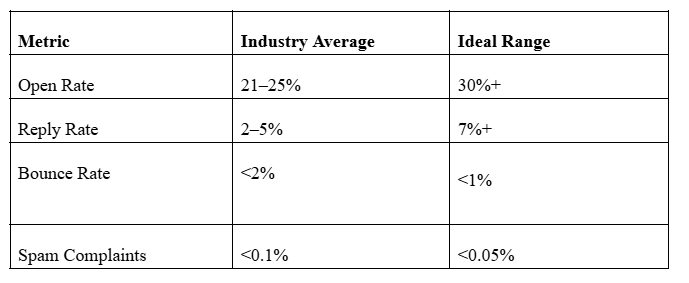
Conclusion: Stay Out of Spam, Scale with Confidence
Email automation is a powerful growth lever—but only if your domain health and deliverability are safeguarded. As outbound campaigns scale, so does the risk of blacklisting, low engagement, and wasted effort.
By sidestepping common automation pitfalls, embracing warm-up tactics, and leveraging smart tools like OneShot.ai, you can guarantee your emails arrive in inboxes—not spam folders.
The secret? Marry smart sending techniques with AI-powered personalization and active domain management. Automation isn't bad for deliverability if executed correctly—it turbocharges it.
Ready to scale without compromising sender reputation? Find out how OneShot.ai drives high-impact, secure outbound automation →
FAQs
Q: What does domain health mean in email automation?
Domain health refers to the reputation and technical stability of your sending domain. A strong domain health ensures your automated emails land in inboxes instead of spam folders. It depends on factors like SPF, DKIM, DMARC records, IP reputation, and consistent sending behavior.
Q: How can automation negatively impact domain health?
Over-automation—like sending too many cold emails too quickly or using unverified lists—can trigger spam filters, harming your domain reputation. It’s vital to warm up new domains, personalize outreach, and maintain consistent send volumes.
Q: What is email deliverability, and why is it important?
Email deliverability measures how successfully your messages reach recipients’ inboxes. High deliverability ensures your automation campaigns perform effectively, leading to better open and conversion rates.
Q: How do I test email deliverability for my campaigns?
Use email deliverability testing tools like Litmus, MailTester, or GlockApps to check spam scores, authentication setup, and inbox placement. Regular testing helps identify and fix issues early.