.png)
Scaling automated outreach is only effective if your emails, LinkedIn messages, and calls actually reach prospects. But it is more than likely that even the best-intentioned outreach is going to end up buried in AI spam filters today, before anyone sees it. The question is really simple: how do you scale outreach to avoid spam?
In this article, we will explore the modern science behind spam detection and offer a road map for building personalized outreach campaigns at scale across channels that stay compliant. You will also see what systems like OneShot.ai have created to automate responsibly at scale.
What Causes Automated Outreach Emails to Be Marked as Spam?
How do modern spam filters analyze email content?
Today's spam filters use much more than keyword lists. Providers like Gmail, Outlook, and Yahoo rely on:
• Authentication protocols
SPF (Sender Policy Framework) — checks which IPs are allowed to deliver mail for your domain.
- DKIM: It uses cryptographic signatures to guarantee that emails aren't tampered with.
- DMARC — tells email providers how to handle messages that fail SPF/DKIM.
Some of the major reasons automated outreach emails get flagged include incorrect or missing configurations.
• Bayesian content filtering
Bayesian filters statistically analyze your email content and compare it with known spam. If elements resemble high-risk patterns—unnatural formatting, excessive sales language, or mismatched HTML—they increase the spam score.
• AI-powered anomaly detection
Gmail and Outlook use machine-learning algorithms that evaluate:
- Sending frequency
- engagement rates
- domain/IP history
- content similarity across campaigns
- user-level complaints
Google's own Postmaster Tools: https://postmaster.google.com show you how Gmail grades your reputation, error rates, and spam complaint levels so that you can identify where problems lie.
What are common spam keywords and phrases to avoid in cold emails?
Spam filters still assess dangerous keywords—particularly in conjunction with poor authentication and low response rates.
⚠️ Common spam-trigger words:
- "Free trial," "Buy now," "Act fast"
- “100% guaranteed,” “Risk-free,” “No obligation”
- “Congratulations”, “Winner”, “Special promotion”
- Excessive financial claims ("Make $X quickly")
- Overuse of urgency (“Limited time!”)
How do email sending patterns and volume affect deliverability?
Email sending patterns and volume play a crucial role in deliverability.
Even if your content is clean, your sending behavior can make you look like a bot.
Key risk factors:
- Sudden volume spikes
- Poor warm-up practices
- Low domain reputation
- High bounce rates
- Sending to unengaged lists
- Repetitive, templated content
Email service providers pay close attention to DNS checks. They also keep an internal reputation score. Irresponsible sending might get your domain completely blocked by external blacklists, such as Spamhaus and Barracuda.
A healthy volume-to-engagement ratio is mission-critical. If you send 5,000 emails and only 20 people open them, providers assume you're a spammer-even if your content is legitimate.
Why does poor list hygiene hurt deliverability rates?
Maintaining a clean email list is crucial for protecting your domain's reputation. Several common problems can arise, including:
- Hard bounces
Frequent attempts to send emails to invalid or dormant addresses quickly undermine trust.
- Spam complaints
Even a minimal complaint rate of just 0.1% can significantly harm your sender's reputation.
- Honeytrap/SPAMTRAP addresses
These are deceptive emails that mimic real ones but exist solely to identify senders who fail to keep their lists updated.
To mitigate these issues, it’s essential to regularly refresh your email list. Services like NeverBounce and ZeroBounce can help by automatically identifying invalid, risky, or temporary email addresses.
How Can You Personalize Outreach at Scale Without Triggering Spam Filters?
Why does personalization improve both deliverability and engagement?
Personalized outreach conveys authenticity. When a recipient opens, replies to, and engages with a message, those are positives a provider perceives.
According to HubSpot's study, https://blog.hubspot.com/sales/personalized-email-statistics
According to, personalized emails achieve:
- 26% higher open rates
- 6–7x higher conversion rates
- Significantly lower spam complaints, better engagement = higher reputation = fewer spam flags.
What types of data should power your message personalization?
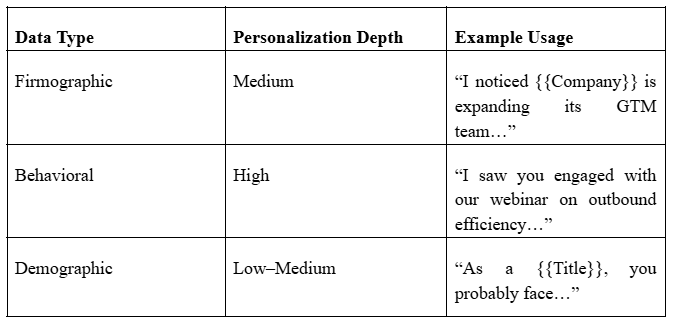
The best personalization is relevant, not shallow. You can personalize through:
Firmographic Data (Company-level)
- Industry
- Revenue
- Employee count
- Tech stack
- Rounds of funding
Behavioral Data (User-level)
- Website interactions
- Email engagement
- Demo requests
- Content downloads
- LinkedIn activity
Comparison Chart: Data Types vs Personalization Quality
How does OneShot.ai create AI-personalized outreach messages safely?
OneShot.ai uses its Personalization Agent and Insight Agent to craft custom, data-powered messaging without over-tokenization or risky patterns.
These agents aggregate firmographic and behavioral insights, then generate unique, natural-language email variants—reducing repetition that spam filters dislike.
Discover how OneShot.ai crafts custom messages safely at scale →
Can dynamic content be spam-triggering? What are best practices?
Dynamic content is powerful but dangerous when misused.
❌ High-risk usage
- Too many dynamic tags (“Hey {{FirstName}} {{LastName}} from {{Company}}…”)
- Broken merge fields
- Overly robotic segmentation
✔️ Best practices
- Limit merge fields to 1–3 per email
- Avoid personalization in the subject line if your domain is new
- Always test dynamic variations before sending
- Ensure fallback text exists
Good example:
“Noticed you're hiring SDRs—teams at your stage often struggle with reply rates.”
Bad example:
“Dear {{FirstName}}, are you ready to increase revenue by 500% today?”

How Do You Maintain a Healthy Email Reputation Over Time?
What is sender reputation, and why is it mission-critical?
In essence, sender reputation acts as a credit score for your domain. When you have a good reputation, inbox providers trust your emails and deliver your messages straight to your recipients' inboxes. When your reputation is poor, your legitimate emails could be filtered to their spam folder or blocked entirely.
Your overall deliverability, engagement rate with recipients, complaint rate, bounce rate, frequency of sending, and the proper setup of your authentication (SPF, DKIM, DMARC) all impact your reputation score. These elements are signals to the mailbox provider of whether or not you're a legitimate sender.
How often should you clean your email lists and why?
There should be a consistent schedule to maintain deliverability and to protect your sender reputation. If your email lists have a high volume of outbound sending, such as SDR organizations, it will be more beneficial to clean your lists weekly, as you can imagine, the lists rapidly change with a higher risk of other factors.
If you're a mid-market go-to-market team, you can maintain your lists a month prior. If you're a campaign-driven team, you can keep the hygiene of your email list prior to launching your substantial sequences or pushes of products.
Regular hygiene will improve your bounces, reduce spam complaints, and most importantly, ensure that you're emailing valid, engaged people. There are also tools like NeverBounce and ZeroBounce that can automate the verification for you in the workflow process.
What role do engagement metrics (opens, replies, clicks) play in reputation?
Engagement metrics are the biggest signals email providers use to determine whether your messages deserve inbox placement. Positive actions, such as opens, replies, forwards, and safe-listing, indicate to providers that recipients find your emails of value, boosting your sender reputation.
On the other hand, negative signals such as deletions without opening, "not interested" clicks, spam complaints, low open rates, and high bounce rates can erode your reputation in short order and push your messages toward spam filters.
To improve these metrics and make sure your emails perform well, it's smart to test them using tools like Mail-Tester or GlockApps before sending them at scale.
How can you use OneShot.ai’s Scaling Agent for compliant email sequences?
OneShot.ai's Scaling Agent helps teams scale their outreach while staying compliant, keeping deliverability intact. It intelligently auto-balances send volume, personalisation levels, warm-up pacing, and distribution of sequences across domains and inboxes.
And controlled automation lets teams scale safely. For example, one customer reported, "We scaled from 1,000 to 15,000 monthly emails with zero increase in spam complaints—thanks to OneShot's controlled sequencing." That's what the Scaling Agent does: it keeps reputation intact while scaling.
Should you use multiple domains for outreach? When and how?
Using multiple domains is beneficial when your outreach volume exceeds roughly 5,000-10,000 emails a month, your SDR team is scaling, or you want redundancy to protect your primary domain. Spreading volume across domains reduces risk and preserves deliverability if executed correctly.
However, poorly warmed domains or misconfigured DNS settings can seriously harm your reputation, so domain management needs to be treated with care. Integrating your domains with platforms like Outreach or Salesloft helps ensure they rotate intelligently and maintain healthy sending patterns.
What Technical Checkpoints Ensure Spam-Free Email Automation?
Have you configured key authentication protocols (SPF, DKIM, DMARC)?
Proper email authentication is important to protect your sender reputation and show inbox providers that your emails are authentic. Your DNS should include an SPF record that includes only trusted sending services, DKIM signing with 1024-bit or 2048-bit keys, and DMARC with a policy of p=none, working your way up to quarantine and, finally, reject as you gain more confidence.
The Google Workspace SPF guide is a good source to ensure these configurations are set up properly. Use DNS record-validation tools and signature-testing diagrams to ensure each protocol is set up correctly and consistently signs your messages.
Are your sending IPs and domains properly warmed up?
Warming up one's domain and IP addresses is an important part of the introduction of new sources to avoid spam filters. A normal plan for a four-week warm-up starts with 10-30 highly engaged contacts per day in Week 1, increases gradually to 50-100 per day in Week 2 with monitored open rates, and scales to 150-250 with more diversified segments in Week 3.
You should be safely able to reach 300-500 emails per day at the end of Week 4 if there is no drop in engagement. Tools such as WarmupInbox and Folderly will automate this process and reduce risks, ensuring a smooth ramp-up.
What sending frequency and list segmentation strategies preserve deliverability?
Deliverability-friendly sending frequency largely depends on your business model. For instance, for B2B SaaS teams, this may be around 50-200 emails per day per domain, with sequence lengths of 4-6 touches, supported by high personalization.
In the case of an eCommerce brand, it may be higher, but succeeding at scale requires behavior-based segmentation like cart abandonment, browse activity, or purchase history to keep messages relevant. No matter the industry, one key factor to staying in the inbox is consistency in sending patterns.
Are HTML and text versions of your email clean and consistent?
Spam filters review both the HTML and plain-text versions of your email, and discrepancies in the two can negatively affect deliverability. Keeping them clean, consistent, and free of superfluous code helps avoid raising red flags. Using tools like Litmus allows a sender to validate rendering across clients, test the formatting, and verify that both the HTML and text versions come through properly before sending.

How Can You Prevent LinkedIn and VoIP Messages from Being Flagged as Spam?
What is the LinkedIn spam algorithm looking for?
The spam detection system of LinkedIn is intended to uphold authenticity and deliver a positive user experience. It will flag behaviors like sending repetitive messages, making a large volume of connection requests within short time spans, using duplicate IP addresses, which likely indicates that an automation tool is being employed, and reusing a template message across different accounts.
LinkedIn can identify these signals as low-quality engagement or automated outreach. The Persona Agent from OneShot.ai can help avoid any flags on the LinkedIn system by generating authentic, highly personalized, human-like LinkedIn messages that are less likely to trigger their spam filter.
Can VoIP calls or AI-generated voicemails get flagged or throttled?
Yes—VoIP platforms such as Google Voice, Twilio, and Outreach Voice will monitor calling patterns carefully. If the VoIP provider identifies any activities that appear like automation and low-quality outreach, it may throttle or even block calling altogether. High-frequency call bursts, repetitive or identical voicemail recordings, suspicious dialing patterns, and low answer rates could all generate flags.
In order to avoid any flags, sales teams should implement staggered calling sequences, modify their voicemail scripts, and exhibit a natural cadence of pacing on each call. All of these changes can keep outreach compliant with VoIP standards and help limit anything from being filtered or restricted.
How does OneShot.ai maintain message quality across omnichannel outreach?
OneShot.ai’s omnichannel engine creates consistent, intent-driven touchpoints across:
- calls
- SMS
A visual campaign-flow interface ensures messages remain personalized and compliant across every channel.
How Can AI Help You Predict and Prevent Spam Triggers Before Sending?
What are predictive spam scoring tools, and how do they work?
Predictive spam scoring tools review your emails before they go out and give you a probable likelihood of landing in spam. They consider a mix of different factors: content-level spam scores, the reputation of your domain and IP, blacklist status, authentication records like SPF, DKIM, and DMARC, and the cleanliness and structure of your HTML.
By examining all these signals in concert, tools like Postmark, SpamAssassin, and MailReach offer an early warning system to find and remedy deliverability issues well in advance of actual inbox placement.
How does OneShot.ai use AI to anticipate and neutralize spam risks?
OneShot.ai actively safeguards deliverability by leveraging AI in finding risks ahead of emails going out. Its Insight Agent scans every sequence for the prediction of what content may trigger spam filters based on patterns across language, structure, and performance history.
Meanwhile, the Integration Agent consolidates the deliverability metrics, CRM data, and sending patterns into a single dashboard for easy monitoring. These systems, when combined, work to help teams prevent issues instead of just reacting to them. You can try out these capabilities for free at OneShot.ai.
Can AI monitor outreach performance in real-time across platforms?
Yes, AI-driven systems can constantly monitor performance across email platforms, including tracking key signals such as open rates, spikes in complaints, anomalies in send patterns, changing list quality, and domain-level health.
These insights update in real time, enabling teams to spot unusual activity early and take remedial steps before small issues become reputation-damaging problems. This level of visibility is crucial to consistent, high-quality outreach at scale.
Conclusion: How Can You Future-Proof Your Outreach Strategy Against Spam Filters?
To ensure the long-term effectiveness of your outreach strategy, you will require a combination of intelligent personalization, best-in-class technical infrastructure, and a monitoring strategy.
This involves customizing messaging informed by behavioral and firmographic signals, maintaining your technical infrastructure with SPF, DKIM, and DMARC, and ensuring you monitor domain health through warm-ups and engagement tracking.
Adding in AI-powered safety nets adds another layer of protection to help catch risks early and avoid more extensive delays. As inbox algorithms change weekly, scalable outreach will require both creativity and compliance.
FAQs
1. Why do automated outreach emails go to spam?
Emails land in spam due to poor domain reputation, missing authentication (SPF, DKIM, DMARC), spam-trigger words, low engagement rates, or sending high volumes too quickly.
2. How can I stop my outreach emails from going to spam?
Warm up your domain, authenticate emails properly, personalize content, limit send volume, and maintain healthy engagement by removing bounced or inactive addresses.
3. Do spam trigger words really matter?
Yes. Overusing promotional phrases, excessive links, or aggressive CTAs can hurt deliverability. Balanced, conversational language performs better than sales-heavy copy.
4. What role does domain setup play in deliverability?
Proper domain configuration—including SPF, DKIM, and DMARC—helps email providers verify sender identity and significantly improves inbox placement.
5. Why do outreach emails bounce?
Common reasons include invalid email addresses, full inboxes, blocked domains, or poor sender reputation. Regular list cleaning reduces bounce rates.